Track clicks and CPM across recorded League matches
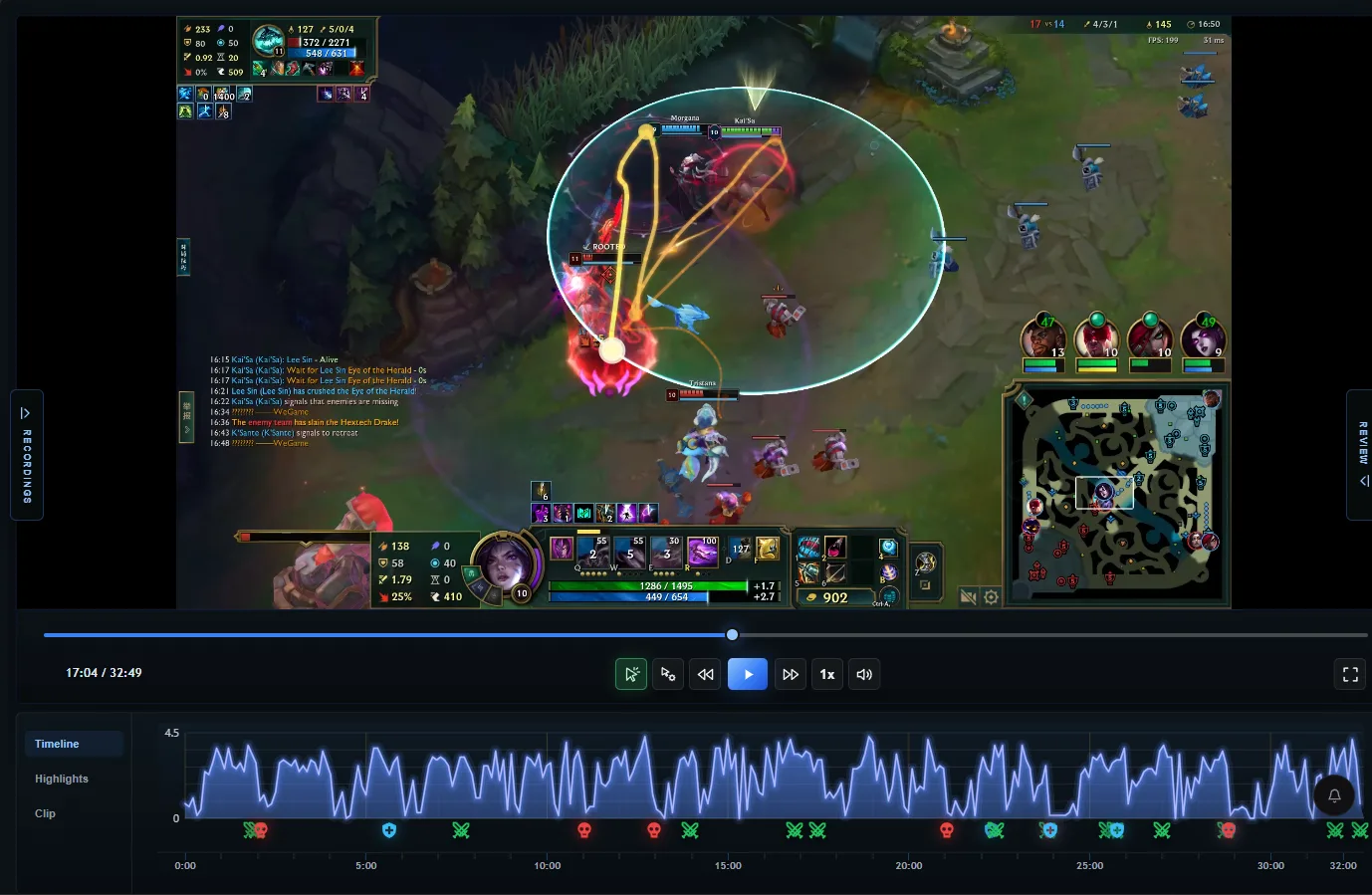
RiftRec records cursor movement and click timing alongside your VOD, then displays click markers, a cursor trail and a clicks-per-minute graph during replay.
Included in the free tier · No account needed for local recording
What it shows
Captured clicks, drawn back over your game
Record a game and RiftRec paints the inputs it captured over the replay — no spreadsheet, just recorded input context beside the VOD.
🖱️
Cursor trail
A sampled path of your mouse movement — useful for spotting overhandling, wasted travel and panic clicks.
🎯
Click markers
Left and right clicks marked where they landed. Interpret them alongside your key bindings and the game state; a mouse button alone does not identify a successful game action.
📈
Clicks-per-minute wave
See how your mouse-click rate changes around a fight or quiet period. CPM is input context, not a skill score or a measure of tilt.
🎥
Camera inputs
Review captured camera-related key presses alongside the VOD. Inputs do not tell us where you were looking or whether you noticed something on the minimap.
⌨️
Keystroke overlay
Keys and mouse buttons on screen — great for VOD review and for streamer overlays in OBS.
⚡
Separate input capture
Input is read at the operating-system level while video can use a supported hardware encoder.
Why it matters
Mechanics you can finally measure
🧠
Find wasted clicks
KDA and CS can't show how you played the fight. Your click pattern can — over-clicking, mis-clicks and hesitation jump out immediately.
🗺️
Review camera control
Pause before a fight and ask whether your view contained the information you needed. Recenter counts alone cannot establish good or bad map awareness.
📊
Compare similar moments
Compare similar champions, roles and situations. More clicks do not necessarily mean better decisions; look for a specific habit to practice.
Three steps
Set up tracking and check your first replay
1
Allow optional click capture
Install the Windows app and accept its administrator request if you want input tracking. You can continue without click tracking; local video recording does not require enabling it.
2
Record a short test
Check your recording folder and enabled League queues using the setup guide. Make a recording with a few deliberate cursor movements and clicks.
3
Verify the replay
Open Videos, play the saved recording, and inspect its cursor path, click markers and CPM graph. Replay overlays control trail length and cursor alignment. Check this before relying on a full match.
CPM means mouse clicks per minute. APM means actions per minute and can include keyboard input, depending on the counter. RiftRec's separate streamer APM overlay counts keyboard and mouse actions; the replay CPM graph is a mouse-click measure. Neither is a count of successful attacks, spells or useful decisions.
Actual RiftRec product screenshot. The cursor trail shows sampled movement; markers show captured clicks; the graph provides click-rate context. This still image is not a benchmark or a video demo.
Pick one moment on the VOD timeline, such as the approach to a fight.
Watch the game state before judging the click pattern. Check targets, spacing and your bindings.
Write down one observable change to test next game using the review worksheet.
No overlay? Check that this recording was made with click capture available. Enabling tracking later cannot reconstruct old inputs. If input is offset, check the replay cursor-alignment controls. For persistent issues, send your app version and reproduction steps through support; do not share private recordings publicly unless you choose to.
FAQ
Click tracker FAQ
What is a League of Legends click tracker?
A click tracker records where and how often you click during a match and draws the captured input over the recording as a cursor trail, click markers and a clicks-per-minute graph.
How does click tracking affect performance?
Click capture reads operating-system input while video recording can use a supported hardware encoder. Actual performance depends on your PC and selected recording settings.
Why does the click tracker request administrator access?
Administrator access allows RiftRec to capture operating-system input reliably while League is running. Click tracking is optional.
Is the click tracker included in the free tier?
Yes. Click and CPM tracking is currently included in RiftRec's free tier and does not require an account for local recording.