Best League recording settings for clear, practical VODs
For most 1080p League recordings, start with a supported hardware encoder, 1080p at 60 FPS, H.264 and either CRF 20–23 or roughly 20–30 Mbps. Test a short recording on your own PC before raising resolution or frame rate.
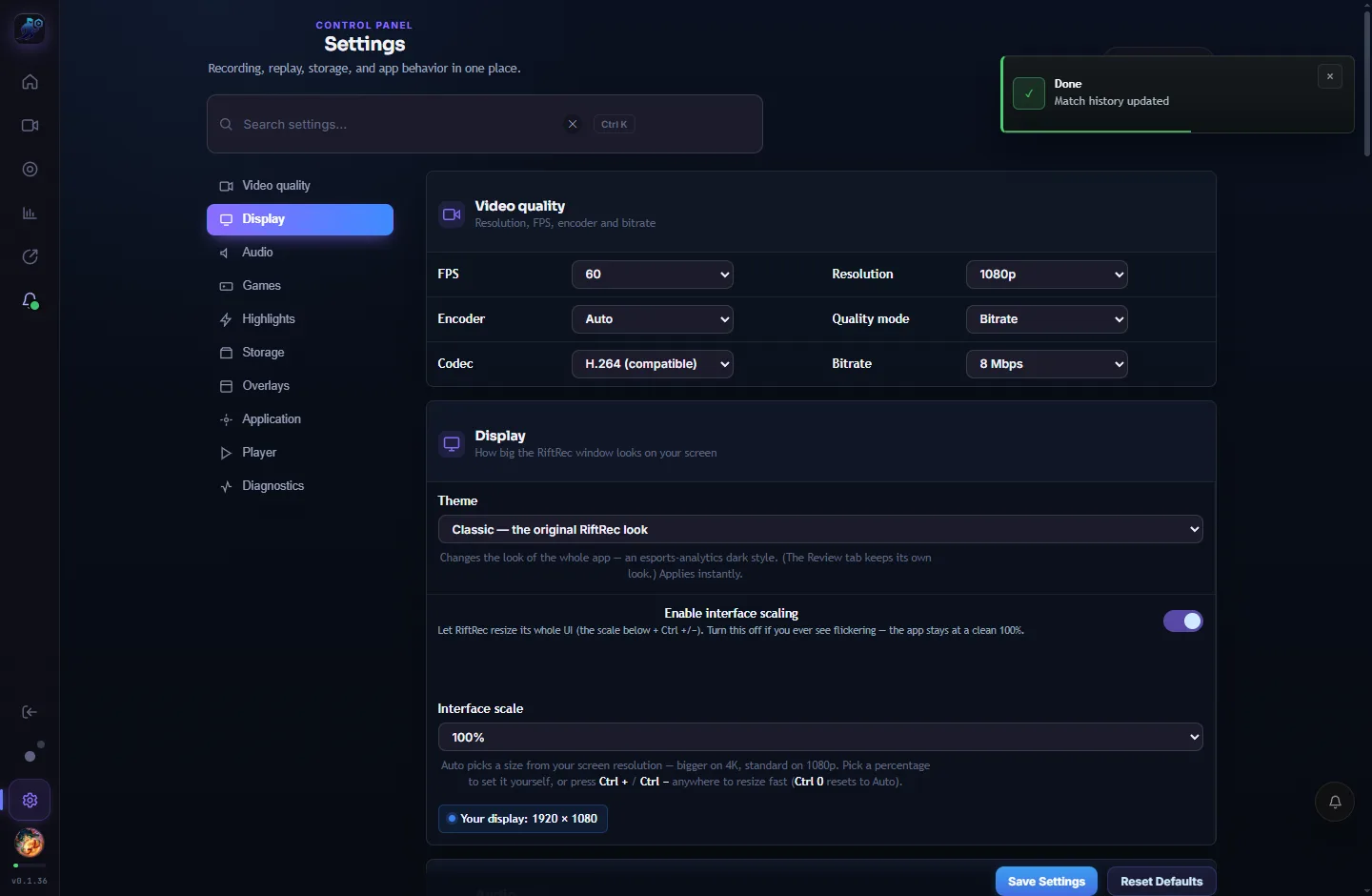
1. Encoder — use your GPU
Leave the encoder on Auto. RiftRec picks a supported GPU hardware encoder — AMD AMF, NVIDIA NVENC or Intel QSV — which moves encoding work away from the CPU. Only switch to a software encoder when troubleshooting a specific GPU issue, and verify performance on your own hardware.
2. Resolution & FPS
Resolution should match your monitor — 1080p for a 1080p screen, 1440p for a 1440p screen. Recording higher than your display just wastes disk with no extra detail.
FPS: 60 is the sweet spot for reviewing League — smooth enough to see mechanics, easy on disk. Go to 120–144 only if you want buttery highlight clips and your PC has FPS headroom to spare. 30 saves space but can feel choppy on fast fights.
3. Quality: CRF vs bitrate
This controls the quality-vs-size trade-off:
- CRF (recommended) — constant quality. Calm scenes use less data, chaotic teamfights use more, so quality stays even and files stay reasonable. A CRF around 20–23 looks great for League.
- Bitrate — a target data rate, not a guaranteed file size. Try 20–30 Mbps at 1080p60, then inspect fast fights, text and disk usage. Actual size depends on the encoder, rate control, duration and audio.
4. Codec: H.264 vs H.265
H.264 is the broadly compatible starting point; test playback in the browser, phone or editor you actually use. H.265 (HEVC) can improve compression when supported, but availability depends on the selected recording path and playback device. Check the saved file's actual codec rather than assuming a setting guarantees HEVC output.
5. Keeping files small
If you record every game, disk adds up. Two easy levers:
- Highlights-only mode — keep just a reel of kills, deaths and objectives instead of the full game.
- Auto disk quota (Settings → Storage) — cap the folder size and let RiftRec clean up the oldest recordings automatically.
Recommended settings
| Setting | Recommended | Why |
| Encoder | Auto (hardware) | Reduces CPU encoding work |
| Resolution | Match your monitor | No wasted detail |
| FPS | 60 (120–144 for highlights) | Smooth & small |
| Quality | CRF 20–23 | Even quality, sane size |
| Codec | H.264 | Broad playback compatibility |
Measured example: 240 FPS game cap, 60 FPS recording
This is an internal engineering test, not a League benchmark or an independent review. On September 7, 2026 (China time), we ran the same Xonotic 0.8.6 replay with recording off, on, on, then off. Each trial measured 60 seconds after a 30-second warm-up plus tool startup, with the game in the foreground for all sampled checks.
Workload: OpenGL, Ultimate preset with 4× MSAA, a 1600×900 borderless game window, 240 FPS game cap, and 1920×1080/60 FPS H.264 AMF output at 8 Mbps using WGC. This upscaled source does not establish native-1080p visual quality. Audio, microphone and replay coaching were disabled to isolate the video path.
| Metric | Recording off | WGC recording |
|---|---|---|
| Pooled game FPS | 233.1 | 228.6 (1.9% lower) |
| Per-trial 1% low range | 93.0–96.7 FPS | 82.0–82.3 FPS |
| Per-trial p99 frame time | 7.90–8.10 ms | 9.34–9.68 ms |
| Average system CPU | 14.7% | 19.9% |
The two output files were 71,581,874 bytes over 71.57 seconds and 72,044,893 bytes over 71.72 seconds, including startup and shutdown. Both fully decoded. Writer telemetry counted 32 repeated frames out of 8,597 (0.37%); that is not a measurement of visually unique frames.
Limits: the owner reported a Ryzen 9 7945HX / Radeon RX 7900 XT Windows 11 system, but this run did not preserve a complete OS-build and driver inventory. It used an optimized isolated 0.1.38-development QA build, not the signed installer. Only two short trials per mode, no audio, no temperature/clock logs and no continuous 30-minute soak. A cap can hide lost performance headroom. Do not extrapolate these numbers to League, other hardware or all recording settings.
Download the four measured trial summaries (CSV). The test executable SHA-256 was a99932a436bd5240295f61ec20c24afb4299174463fcd685cc5f09d0b91b2814.
Repeat a useful comparison on your PC
- Record the exact app version, Windows build, GPU driver, CPU/GPU, capture backend, encoder, resolution, quality setting and audio state.
- Use the same replay or repeatable scene. Keep the game cap fixed, record at 60 FPS, warm up, and avoid alt-tabbing.
- Alternate off/on/on/off, repeat the sequence, and compare frame times and low FPS as well as average FPS. Do not mix live-match situations into a controlled comparison.
- Then record a continuous 15–30 minute session with your normal audio and overlays enabled. Play the beginning, middle and end, check sound sync and file size, and inspect memory growth separately.
How much space does a 30-minute recording need?
For a target video bitrate, estimate decimal GB as Mbps × seconds ÷ 8 ÷ 1,000. These are arithmetic estimates, not measured RiftRec file sizes; audio and container overhead add space, and variable quality can vary substantially.
- 8 Mbps: about 1.8 GB per 30 minutes.
- 20 Mbps: about 4.5 GB per 30 minutes.
- 30 Mbps: about 6.75 GB per 30 minutes.
Use a short recording of your own busiest gameplay to check readability before lowering quality. An automatic storage cap removes older recordings according to your settings; copy important VODs somewhere safe before relying on cleanup.
For automatic match capture and local storage details, see the RiftRec LoL recorder.
Record your next game the right way
Free for Windows — sensible defaults out of the box.
Download RiftRec free